Main Nav

Showing posts with label useful. Show all posts

Jun 2, 2012

Online Free Vector Graphics Editor

Do you know how to draw a vector line Apple iPad? No? Most likely you do not even know that there is such a powerful on-line vector graphics editor of Aviary's -Raven ! Online applications are constantly evolving, because today they can achieve a good result. Before moving on to the review of this application, I would like to see that developers mougt Aviary boasts not only the product. On this site you can find a collection of useful online services for designers and graphics, which I once wrote in one of his blogs. In addition to online vector graphics editor can find the usual graphic editor, tools for creating effects, working with palettes, and screenshots.

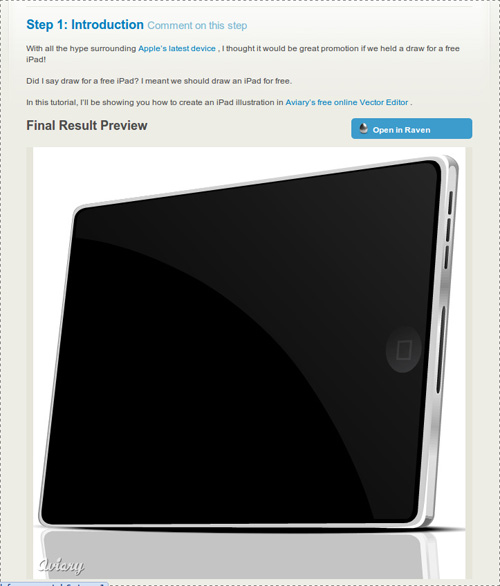
But back to our Raven and Apple iPad - not to be unfounded, the tablet will give an example, drawn with the help of Raven:

draw the Apple iPad

In fact, even today this illustration - not an easy task for an untrained person, even if his hand is CorelDraw or Adobe Illustrator, to say nothing of a web application? But, as you see at the moment it is quite doable task.Moreover, the site Aviary, a simple tutorial, you will learn how to even. But let us still closer look at the editor!

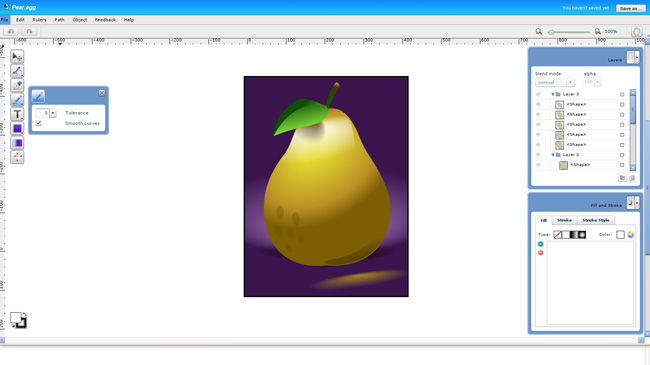
Interfeyc Raven is not as complicated as those mentioned above, CorelDraw or Adobe Illustrator, so the application can be considered even as a testing ground for the study of vector graphics:

online vector editor

Of course, the functional to full vector graphics editor application that far. But do not forget that this is a online service which, by the way supports even things like layers and blend modes (Blend mode).

Complete engine "curves." Working with curves, fills, strokes, gradients and objects is realized at a fairly advanced level (of course, not as in CorelDraw or Illustrator, but still);

Supports layers. It supports layers, groups, layers, layer masks;

"Import" from the popular social services. Import from Flickr, Picasa and Facebook;

The training system through the tutorials. While they certainly are not enough, but to all appearances their number will keep growing.

In short, Raven - a very neat and functional online editor of vector graphics. If you do it, I advise you to look necessarily. Finally I bring to your attention a little video about how to create a small vector image using Raven:


In principle, any online applications are not yet able to completely replace the desktop solution, but due to their mobility can compete with them in certain situations.

Read More →

Six Basic Steps of Site Development

I was here recently in the comments said that some positions do not correspond to the format of the blog, which is positioned just a useful resource for web designers. If you want a competent and professional approach to the process of developing store websites, it is necessary to need good ecommerce hosting for best performance of site. On the one hand, it is really a lot of attention paid to the graphical editor, for example, photoshop, but on the other - this is also part of the work, and no small. However, today decided to publish a post that would be willing to partially satisfy the read something about creating websites. In this case a web design, I decided not to limit, and consider more broadly.

If you want a competent and professional approach to the process of developing websites, it is necessary to take into account all the details and carefully consider all stages of the project . In this case, nothing can be overlooked, even though developers are often guilty of this. As for the "stages of creation," then perhaps they can each have their own, that depends on who and how used to work. Nevertheless, there is a list of common (recommended) items that it would be desirable to perform. In any case it is useful to define for itself a clear structured plan to ensure that no detail is not overlooked.

Typically, a workflow on a project is as follows:

  • The study of the issue;
  • Design, concept development;
  • Design;
  • Create a site;
  • Launching the site;
  • Support for the site;

As a source of inspiration was used by this article . Let's look at each step in detail.

Study

"Why learn something?" - You ask - "we are enough experienced people." In fact, this is one of the most important steps. You may be an experienced developer but nothing has been understood in a "women's shoes," which will be dedicated to the site. Therefore, before proceeding to phase development of the site you must have an understanding of the subject and the subject site which will be dedicated. Not that the need to delve into all the details of this niche, explore a variety of models of women's shoes, simply estimate the basic features and nuances of the subject area.

When you're designing a site for a client, take as much time as the initial communication with the client. Need to know about the goals and objectives, timelines, target audience, the proposed budget and other matters. Get as much information. At the end of this stage you should have a clear understanding of what is required of you. This difficult task can help you such a thing as a "brief." This is something like a list of standard questions on the future of the project, where you can learn the preferences and wishes of the customer. Of course, "Brief for the development of the site" will not replace personal contact with the client, but can be used in the initial stages of cooperation - straighten it by mail, or to make a survey over the phone. In the "brief" can include various issues - from the audience of the project, the proposed budget to personal preference in design and functionality of the site.

The overall design, layout

Once you have decided on the goals and objectives, you can begin to develop a basic layout . This phase can start by visiting competitors' sites. Surely someone has done something similar to you. Therefore, the first task - to study the best examples of sites on the same (or similar subject) and note for themselves the advantages and disadvantages of each. Given the experience of competitors, you can proceed to breynshtormu in which you need to determine the overall design concept, the basic elements, colors, fonts and so on. Do not forget at the same time, of course, and the wishes of the customer.

The last stage of the design - a sketch of the framework. It can be done on paper, by using special programs and services. If you're working with a client, be sure to confirm the layout of your base before you move on. In principle, in my practice, I saw that "the basic outline of the layout" is not always approved. An exception may be considered a design of logos, where it is important to understand just which direction to go. But as for the design of sites, not all customers can understand something from scratch is usually determined by the basic site structure, layout and color blocks. Although to some extent, it can be considered a "sketch" :)

Site Design

design development siteIt's time to "build on our frame of meat." Many designers and developers are just beginning to this stage, ignoring the "study questions" and "layout". In my opinion this is not entirely wrong, rather, that the preparatory steps you will work much easier and more efficient - all the basic questions and decide for yourself the details before, but now concentrating on building design. Thus, studying the subject and having passed through the stage of creating a simplified layout, you have pre-determine the content and then do not miss anything of the kind. Design - this stage of the determination of the shape in which you clothe your content, it details the layout.

Typically, such a design is created in Photoshop or another image editing program. The finished design should virtually match the final product (the elements, colors, images, fonts), except that the text can be inserted until the staging. It should be remembered that the design development includes not only the main page, you must also develop a sub, and maybe "alternate versions" for mobile devices, or any other special purposes.

Always confirm the finished design with the customer before continuing to the next step. Then go back and redo it will be harder (more time consuming). Be sure to pay attention to this nuance of the customer - imagine yourself that you have completed all work on the coding or installing the cms, but here the client suddenly changed his mind about the design. This, of course, it happens, but it should be to minimize risk.

Created by

At this stage we need a "picture" (detailed design) to make a living site. This stage is different from the webmaster varies considerably. It all depends on how, on what basis and for what CMS (if any) you write the code.Experienced artists are usually already have a pre-made "blanks» HTML / CSS, so after "cutting" the necessary elements in Photoshop, the process may take a markup is not too much time. Do not forget in this beautiful andcorrect HTML layout .

After writing, debugging, testing in different browsers, validation and error correction, you can proceed to the next step. Incidentally, after this stage I personally also give the result of the customer for approval, if the site is developed on the cms typo3 where you want to connect (to adapt) the generated HTML in the admin. If we talk about wordpress , then there is probably better to create a template without the "pre-layout".

Launch Site

If your site is perfect, "tweaked", and all works perfectly like it, you can finally publish it. Do not forget to check out all the good (good to have on this case prestart checklist), after the upload to the hosting site via ftp, once carefully all potestiruyte. In principle, you can do immediately to create the site hosting - in this case, first, do not have to "relocation site" from the local machine, and secondly, all tested in the real in the real world (and host settings), in- Third, the customer can monitor the process performance.

Site Support

It is not in the literal sense of the word stage of development, but to resolve the issue of support and further development costs in advance - will you address this issue, or the customer will be able to do everything himself.In addition, after the date of the site, developed by a management system (CMS) should provide the client with documentation on working with her, or a little training.
Read More →

May 31, 2012

Redesign: A Few Indicators That His Time Has Come

Redesign. One word can make all shudder a web designer and developer. The imminent danger in the form of constant revisions and improvements of the project, as well as indispensable to their shareholders' views, "the team are immersed in the depths of despair, the site (the more, the more options for the redesign is considered).But despite these realities, it is necessary to admit that redesign is an integral part of the life cycle of any online resource. We look at a few key indicators that clearly signaled that the time has come redesign. And if it does come, how solid it should be.

Site statistics for fall

The main indicator that the site needs work, is a downward trend in the statistics of the site. Of course, this symptom may be other reasons (for example, your product does not meet the requirements of the market). But if these reasons are eliminated (or offset), the steady decline in conversions, sales, and the interactions of the total activity of users indicates that the current design outlived its usefulness. Many attribute this to the "satiety" users old design. But in reality it is an indicator that you've lost touch with their audience. If you want to redesign solved the problem, analyze the actions of visitors and see where in the workflow design flawed. And then enjoy a correcting these flaws in the first place.

redesign of the site

Metrics - the most important indicator

The extent of the changes in design may be limited to: correction of the sequence of conversion or optimization activities associated with the product. It is not necessary to completely change the image of the product, generated for an external audience. Many webmasters and emphasize the effect of changing the force redesignthat results in increased traffic the project.

Your users will say that the time has come

Indicators of site statistics - the most obvious indicator that instantly makes you realize that something is wrong.But to understand what is wrong, you have to communicate with their customers.

Poll - a good tool for such purposes, but the test for usability is much more effective. If you have a blog on wordpress, it will help with the voting plugin WP-polls . The gradual development of the dialogue in person allows you to analyze the dynamic process of interaction between the audience with the site. In a typical survey is impossible. If during the test, you will come across with some strong opinions that shed light on the reasons for the decline of metrics site (and you run into them), this means that it's time to redesign.

Tests on usability , not only reveal problems but also the dominant attitude toward your product. It can also be used as a basis for redesign. In some cases, negative attitudes toward the brand may be reason enough for a redesign. But all this you will never know if you do not communicate with their customers.

time to do a redesign

The final decision is yours

Fidbek from customers helps us understand exactly what to change in the site and to what extent. Most often, communication with buyers focusing on individual elements of the business process. And it is these elements should be addressed in the redesign. But if users fidbek was quite extensive and affects many aspects of the site, it makes sense to use this information for a more thorough redesign.

List of technical and UX-debt becomes too long

Note: Technical Debt (tech debt), and UX-duty (User Experience debt) - this is the work of the project, we decide not to do at this time because: Deadline "burning", the leadership is putting pressure, etc.

In the process of developing a product or Web site, the company begins to accumulate technical debt and UX.These debts - the work that had to be done at the initial stage of development, but either it was not time, or you had to do something easier and cheaper to run the project on time. With each successive iteration of this sheet "debt" will inevitably grow until it becomes so long that all of these defects can no longer be correct.

There are many ways to keep growing list of those debts in a relatively stable level, but at some point it reaches its limit.

If your car ever breaks down and the repair is more expensive than the cost of the car, it is easier to pass on scrap metal. Similarly, the site at some point simply to rewrite than to correct any errors. This is an excellent time to carry out redesign.

When the list of debt becomes too long, it's easy to succumb to desire to do "partial redesign", correcting some flaws. However, these actions lead to what the Americans called the «death by 1000 paper cuts». Which means: more small fixes you make, the more you have problems with other functions of the site. If in fact sheet debt reached its limit, it is necessary to think seriously about the redesign.

It just looks "old"

The appearance of the site affects how users perceive your brand and what level of confidence in him to have. Even if the design of the site has been the trend at the time of launch, but today it can no longer be the case. The design is constantly changing and evolving. The "old" design will prevent the development of the product, and it will affect the performance of site statistics - they will fall.

How do you know whether your website is obsolete? Look at your competitors. Look at the widely advertised new projects in other areas of business. Compare your design with those samples that are really well executed. This will allow you to see whether your design current trends. The complexity of this approach is that the approach to the assessment of other possible sites without bias. Seeing your site every day, constantly working with them, you may feel at some point that he is old and needs updating. Check if your objective evaluation, comparing it with what they think about this site your employees.

doing a redesign

Decide what to remove, and that add

In this case, the redesign will be superficial and will affect the update of the presentation layer of the site. With this redesign scenario of user interaction with the site or the conversion of the scheme remain the same. Although, no doubt, upgrade design will have an impact on users and on the conversion.

In conclusion,

Our list included a few simple indicators that clearly indicate that it is time to redesign. But they are certainly more. The number of indicators that appear in your situation will determine the need for redesign. While each of these indicators is itself reason enough to update the site.

Maintaining the current trend and design in an online environment brings good dividends in the form of a stream of new customers conversions and brand commitment. In addition, it has an effect on employees. Seeing a regular on the horizon, the upcoming redesign, they will try to keep abreast of technological developments and design finds.

PS Redesign beuslovno good thing, but we should not forget about the promotion and SEO optimize your site for search engines, the only way to increase its audience. 

in particular need to promote if you have a business on the Internet whether photobanks for earnings in the photoor cooperation with the various exchanges of automatic links and articles. 

Travelers to cities in Ukraine, or those who travel on business trips, apartments in Kiev on the financial possibilities largest selection of apartments and convenience please.

Read More →