Main Nav

Jun 27, 2012

5 Factors that Affect a Designers Creativity


Everyone is creative in their own special way. Most of the time, though, we especially assign the word ‘creativity’ to people with a gift in the visual arts. When you consider graphic designers, for example, they seem to have no limits to their creativity. It just seems to be one creative work after another for them. In reality, graphic designers are much like the rest of the world. They also have mental blocks from time to time that keep them from being creative. If you’re a graphic designer, you know what I’m talking about. It’s always a terrible day when those roadblocks come at you to take away your creativity.

Here are five factors that affect a graphic designer’s creativity and how to overcome them.

1. Fear of Risk
One big reason why graphic designers are creative is because they are risk-takers. They do things no one else would have thought and this allows them to be creative. There are times, however, when designers become afraid of risk-taking because they don’t want to fail or they don’t want to be criticized.

A good way to overcome this is by remembering that failing doesn’t make you a failure. It just means you failed. Even the best people do. Realize that failure is a step to success and try to do better the next time around. Also, being criticized is normal for everyone including the most talented ones. Criticism can either make you or break you. Make sure that you know how to distinguish between a constructive criticism and a destructive one. Learn from the former and dismiss the latter. By applying these two things, you might still have some fear of risk but at least you can now take the risk despite the fear.

2. Clients demands
Everyone needs clients. In fact, as a graphic designer, you need more of them if you want to stay in business. Sometimes, though, the clients are the ones keeping you from being creative by having unreasonable demands that you can’t keep up with them. So what do you do?

First of all, if the demands are too much, make sure that you speak to them clearly and objectively, showing your clients why it is that their “requests” are not doable. Secondly, you need to realize that freedom to do whatever you want doesn’t make you creative. You are creative precisely because you can solve a visual problem in ways that others without your talent, skill, and experience cannot. So go ahead and try giving in to what your client wants. You just might realize that the client wasn’t too demanding after all. And if the client really is over-demanding, you can always drop him for another one. Problem solved.

3. Being a perfectionist
Creative people always find a way to improve on their work. But sometimes, perfectionism can keep you from being creative because if it’s not perfect for you, then you might as well do something simpler but perfect. Right? Wrong! If you want your work to be perfect, then it will be difficult to be creative. Sometimes, what makes some works of art amazing is the imperfections that you find in them. Just take a look at some paintings. They seem perfect from afar but when you examine it more closely, you can actually see some of the imperfections.

Just do what you can with whatever you’re given and allow your mind to freely create without perfection as the goal. One way you can solve this perfectionism is by having different solutions to a given creative problem. By doing this, you allow others, especially your client to choose the one that’s best in their eyes. This might make you see that even with your creativity, some of the stuff you do are perfect but they’re perfectly wrong for your client and the ones that you made imperfectly but creatively are the ones your client actually needs.

4. Cramming
Perhaps one of the biggest and worst of the roadblocks to creativity is cramming. Sometimes it’s the client’s fault and at other times it’s the graphic designer’s fault. But you can’t do much about the client’s fault unless you can talk to them about giving you the job earlier.

If it’s your fault and you often find yourself cramming, here’s a good solution especially if you cram most of the time. Give yourself a deadline with days or weeks to spare before the actual deadline. Have someone check on you and probably even boss you around to force you to work on the deadline you’ve set. This will get you to focus on the work you need to do earlier and give you more time to edit what you’ve done before the real deadline comes.

5. Stress
Stress can make a person sick. It can also block your creative juices. Negative stress has no benefits at all. It will harm you and keep you from doing some of your most creative work.

There are several ways to deal with stress but the most common and important ones are getting some rest, sleep, and three good meals a day. The mind simply cannot be forced to be creative with stress. Believe it or not, your mind will solve your most difficult problem after a good night’s rest and a hearty breakfast. I’m sure it has worked for you before and it will continue work for you again.

Having roadblocks to creativity are normal. They happen to everyone. The key is in identifying them and solving them objectively. Hopefully, with the factors and the solutions we mentioned, we’ve helped you do just that.

Author bio:
Alexis Thompson is an alumna from Martin College Australia, a former Mountain Backpacker and a 26 year old mother of 2 daughters, Sophie and Rhian. She is into almost all types of Music especially The Fray and Hillsong. She also has a passion in Singing and Scrap Booking. Follow her escapades on her Twitter.
Read More →

Jun 24, 2012

Examples of Perfect Landing Page Design or Tips

Perfect Landing Page Design


Landing pages are one of the most important key to the business and its product or services, yet while creating the landing page most of the times companies don’t create effective landing page. There are numerous landing page example available online, to get tips and guidelines to create good landing page inspiration example.


For the success of the online business marketer, it is very important to have an effective landing page, as the effectivness of the website’s landing page is very important quality for success of the online business to sell their products and services.

Few important aspect to be considered while creating the landing page is, to make sure that

There is no information that deviates the customers to other websites.
Should have the focus to effectively sell your products and services
Landing page should portray crisp and clear information about the products, for the user to undersatnd eaisly
Just one or two click for the buyers to make purchase on your site
Site should not have to many links to frustrate the customers, while making purchase
Awareness to cost of selling your products and determine the profit
Content of the page should be short and understandable
Products or services  should have relevant words and sentences, to sell
Important words should be me made bold, to get the attraction of the viewer in just few seconds

The most important factor for the success of the online business is, the best landing page example along with the quality of the products. Businesses may fail or succeed depending on the effectiveness of the  landing page on their website. Customer only takes few seconds to view a website they come across, and here it becomes essential to focus on the landing page inspiration. It is not necessary for a landing page to be a home page, but should be more persuasive, accessible, and usable to develop trust in the brand and the product.

1. Tea Round


Tea Round

2. GreenLighted


GreenLighted

3. ClubDivot


ClubDivot

4. Tropo – The SMS Experts


Tropo – The SMS Experts

5. Asking Canadians


Asking Canadians

6. Strawberryj.am


Strawberryj.am

7. dribbblr


dribbblr

8. Virgin America


Virgin America

9. CleverScale


CleverScale

10. Mammoth Lakes Ski Accommodation


Mammoth Lakes Ski Accommodation

11. Basecamp


Basecamp

12. Square


Square

13. HBloom


HBloom

14. Wistia


Wistia

15. Shall I Buy


Shall I Buy
Read More →

Jun 11, 2012

Why Thesis is the Best Wordpress Theme


Many people have made a big deal about the Thesis Wordpress theme ever since it came out. While there is a lot of hype, many people aren’t thrilled about spending $87 for a personal license. At the same time, Thesis has some real advantages over many other premium themes. It really is the best theme out there.

Highly Customizable
Many Wordpress themes claim to be customizable, but very few rival the power of Thesis. You can instantly change your blog from a two-column layout to a three-column one. Uploading a header is the same as uploading an image, so there is no confusing code to go through.

Most of the layout options can be changed with just one click. Very little coding is needed for any layout changes. The layout changes are also clean. You don’t need to worry about certain elements being improperly moved or shifted. Everything looks perfect.

Browser Compatibility
What looks fine in Firefox may look terrible in Internet Explorer. Many people have experienced this problem, and it can really limit the number of people who use your website. Thesis doesn’t have that problem.

The theme will look the same in every browser. There is no need to perform any compatibility tests, as there will be no differences.

SEO Capabilities
It’s funny. Most Wordpress blogs are used by Webmasters who want to hit the top of the search engines, but very few are ever built with SEO capabilities. Thesis has a built-in SEO program that does most of the optimization for you. You can also fill out the meta information, and there is a redirect tool if the page isn’t working.

Thesis is also built on clean coding. Some Wordpress themes leave a huge footprint that affects loading speeds. A website that loads slowly is put at the bottom of the search engines, so Thesis will help your SEO.

Targeted Advertisements
Do you have one post that really doesn’t benefit from the other ads you show on your blog? Thesis allows you to target ads to specific posts. This ensures that the ads shown on each post are relevant to the reader. You can also move the ads around, and you can make many other changes. No coding is needed to make these changes.

Few Plugins
The Thesis theme takes the place of many Wordpress plugins. For example, its SEO function is almost the same as the All in One SEO plugin. This keeps you from having to find and download any of these plugins.

While there is an obvious benefit to not having to search for plugins, there is another benefit that some people may not consider. Wordpress is constantly updating, but many plugins do not upgrade at the same speed. This means that the plugins may sometimes not work with the new Wordpress version. If this occurs, then the plugin will no longer work.

New Fonts
Many people want to use different fonts in their posts, but most Webmasters are worried about the fonts not being browser compatible. Thesis is able to use Google Web Fonts. This gives you a long list of new fonts you can use without having to worry about certain users being unable to see the font.

Conclusion
Thesis has a huge list of features. You can easily change the theme, use its SEO features, change fonts, target ads and use fewer plugins. It does more than any other Wordpress blog theme out there, so it definitely deserves that $87 price tag. If you need a theme that really works with you, then Thesis is that theme. Don’t forget you will also need high speed internet service for uploading and downloading content. AT&T has cheap internet offers which you can review by going to
Att uverse coupon codes.
Read More →

Jun 2, 2012

New Beautiful Free WordPress Themes

Today I want to share with you a pleasant discovery - new beautiful WordPress themes (themes) for the blog.For a couple of years of work on the internet I had to deal with different content management systems. Some touched only superficially (as, for example, made ​​two stores on the vamshop , the other had a long time to work, learn and accumulate knowledge - about the TYPO3, I wrote the article partly work on the Internet - web programming . But now my attention was entirely devoted to Only WordPress - a system that mainly designed for creating blogs. All of my blogs and sites that they like working for this great CMS. Of course, it is not without flaws, but allows you to create beautiful, comfortable designs for men.

One of the first steps in creating a new project is the selection of WordPress themes . Sometimes it can take several hours - in fact in the network are so many interesting functional designs, although not all of them will attract your attention. A lot depends on the subject and focus of the project, but most often I choose wordpress themes are not only visually appealing but also have a certain set of functions necessary for me - in most cases it is a three-column layouts. But even taking into account this factor, the choice still seems to be very difficult due to the large number of designs. By the way, recently found some interesting and beautiful wordpress themes, you may enjoy and be useful for their projects.

Touchriver wordpress theme

Wordpress Theme

Download / / Source

This wordpress theme consists of 2 columns, supports widgets, and contains almost all the necessary pieces of information for the site - archive, categories, recent posts, tags. There are two menus, one of which is a drop-down, a separate allocation for the "selected" articles with a nice switch, and a large stylish footer where you can find the block "on the project", occasional (receive a random) posts and photos from the Flickr photo sharing site .In general, very, very attractive wordpress theme for personal or topical blog.

iGreat wordpress theme

Wordpress themes

Download / / Source

This wordpress theme is suitable for projects of any niche - a clean and elegant design combined with good functionality (all the way I like :) From the main options are: blank advertising banner at 125 × 125 and 468 × 60, 2 speakers, support Gravatar , widget Twitter. The template has a fixed width, seo optimized, the archive will also find some files. PSD. In the development of tested compatibility with major browsers IE, FF, Safari.
Foodiary Premium Magazine WordPress Theme

Download wordpress themes

Download / /Source

Foodiary - a three-column wordpress theme supports widgets, customizable features and advanced footer. In the latter you will find a calendar, recent posts and comments . Pattern has a very original design with elements of informal sketchevogo style - handwritten inscriptions, background of the notebook, all sorts of pieces of paper, pen, etc. Some of this you can see in the picture above the template. In addition, it is: a place for banners 125 × 125, a stylish automatic switching "selected articles", the social buttons (Twitter, subscribe to the RSS, adding a bookmark), automatic generation of image positions, the unit blog search, navigation, gravatars, tree-like comments. This wordpress theme has been tested in all major browsers, IE7, 8, Firefox, Safari, Opera, Chrome, is compatible with wordpress 2.8 and other versions of the system.

CrossBlock WordPress Theme

new wordpress theme

Download / / demo / / Source

Beautiful free wordpress theme with features of premium templates, such as an animated change of elected positions, display photos from flickr, the publication of recent tweets, social bookmarking buttons and more. The design is almost in monochrome black and white, has a fixed width, gravatar support and widgets. Tested on FireFox, IE6, Opera, Safari, compatible with different versions of WordPress up to 2.8.3 (although I am sure that will work with future versions of the branch 2.8). In the sidebar you will find tabs to save space, where the output categories, comments, and recent posts. Template has been prepared for integration with Google Analytics, Adsense, Feedburner, and Webmaster Tools, plus as mentioned above - works with Twitter, Flickr. In general, what is called "complete mince." But that's not all - in this wordpress theme code built to support the display of navigation, the connected stations, automatic detection and display of the most popular articles, support sites for banners and comments in the CSS files for easy modification patterns. What can you want? - In my opinion, there is everything!

I hope the collection of WordPress so (themes) you like - there is also the original design patterns, and functional, and stylish - in short, for every taste.

Read More →

Creating the Windows 7 Wallpaper for your Desktop

Probably not in this world no ITshnika who has not heard of the release of Windows 7, many have even managed to set it as your home Windows. I myself am in the process of installation - recently bought a new hard drive, 2 cooler for the body and found I needed the distribution of Windows 7. What is missing is time to take off everything and work, but to concentrate once and get away with cumbersome and dreaded Vista. So for those who are still in, as I propose to put in thought a motivational wallpaper in the style of Windows 7, but instead to look for them, we will try to draw them yourself in a photo editor Photoshop (English version).

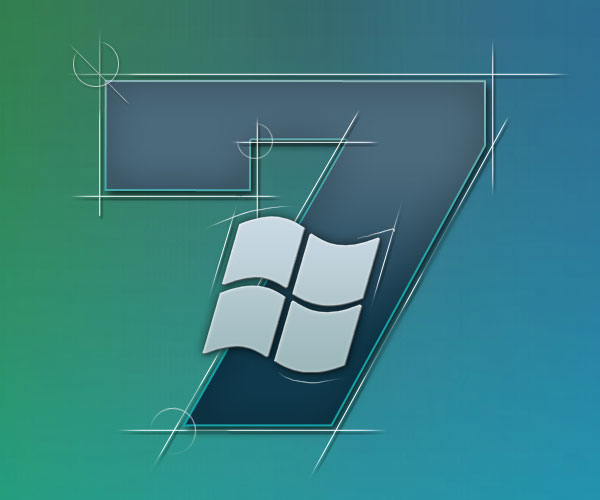
So in this tutorial I'll show you how to make a beautiful wallpaper of Windows 7 . Here we go. To begin with, by the way, I propose to evaluate the final result of our work:

Wallpaper windows 7

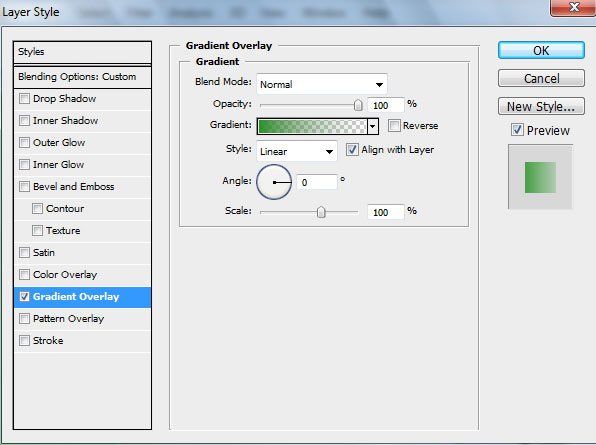
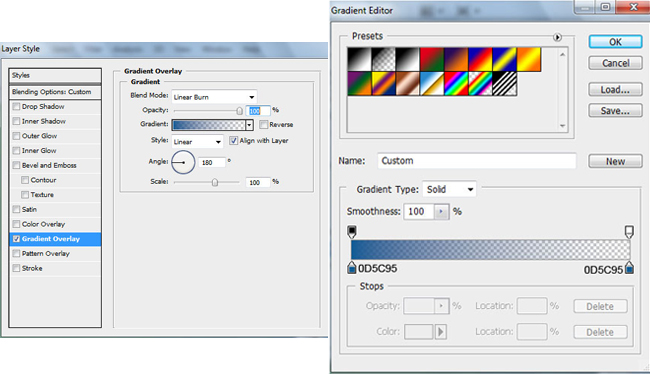
Create a new file (File> New) size of 1920px to 1200px, in the "Background Contents" select White. Then knock out the tool Rectangle Tool (U) and draw a rectangle. Fill the parameter is set to 0% and go into the settings of the layer (Layer Style), then proceed Styles> Gradient Overlay.

Photoshop gradient

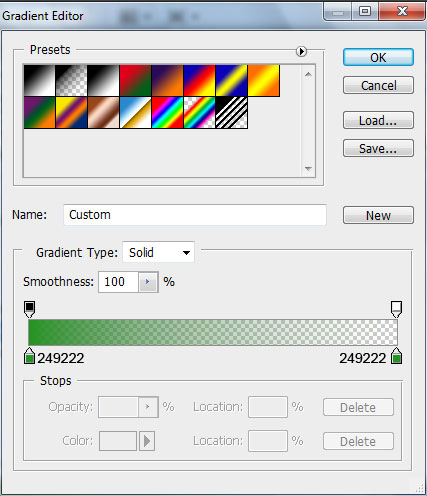
Select the Gradient Editor by clicking on the gradient, pay attention to the colors used codes:

Photoshop gradient

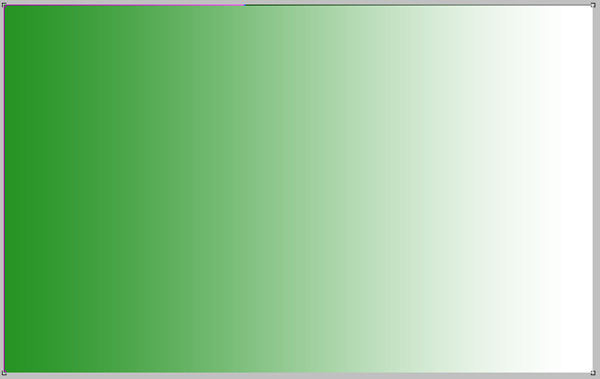
The result will be something like:

photoshop gradient

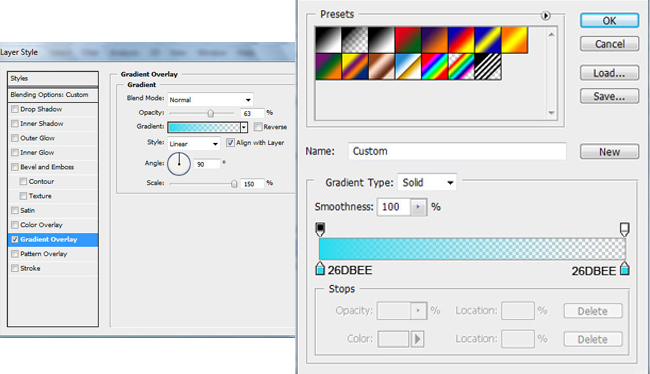
Use this same technique to create another layer of background. Again, draw a rectangle on the screen. For him, just expose the Fill to 0% and go into the settings of the layer (Layer Style), to the point of Gradient Overlay and choose a different color.

photoshop gradient

Should have:

photoshop gradient fills

Then again, select the tool Rectangle Tool (U), select a rectangle slightly smaller, and fill our new gradient background. The newly set to Fill the layer to 0%, go to the settings of the layer and go to Gradient Overlay.

photoshop gradient

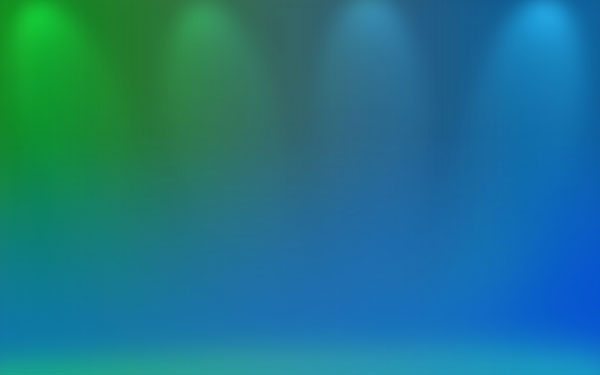
Total we have the background wallpaper in the style of Windows 7

photoshop gradient

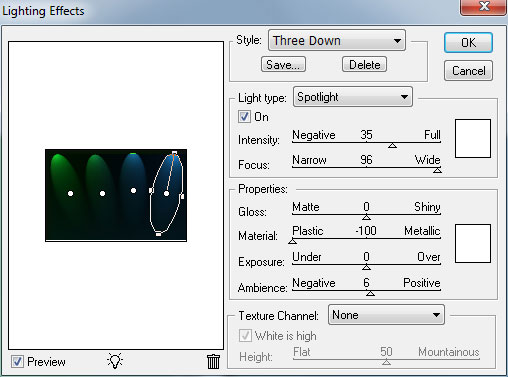
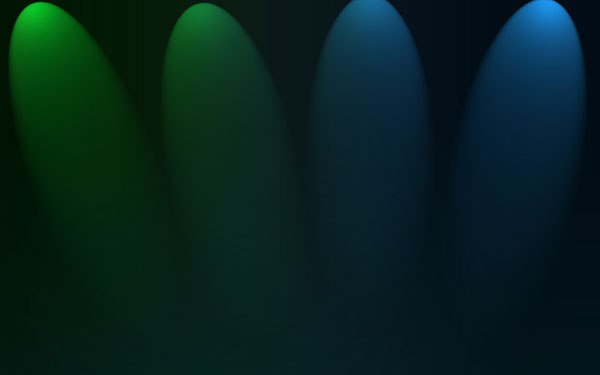
Now we make from all walks of one image, it will be the background. Select them all (hold down the Ctrl key and click on each layer) and press Ctrl + E, or click the right mouse button and click on "Merge Layers". We had a merged layer. Next, make a copy and go to Filter> Render> Lighting Effects.
photoshop lights effects

photoshop lights effects

We set up the layer Blend Mode to Mode Screen.

photoshop Blend Mode

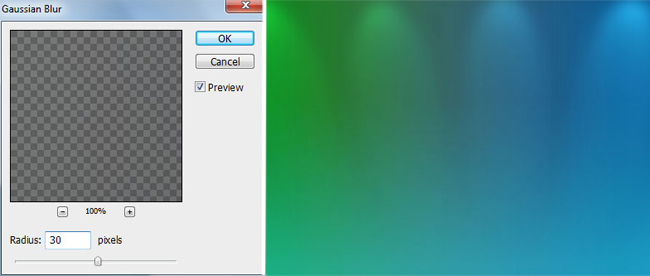
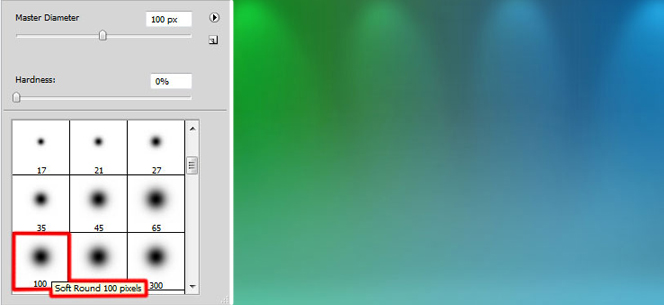
As well as set up in the box Blur Filter> Blur> Gaussian blur.

Gaussian blur

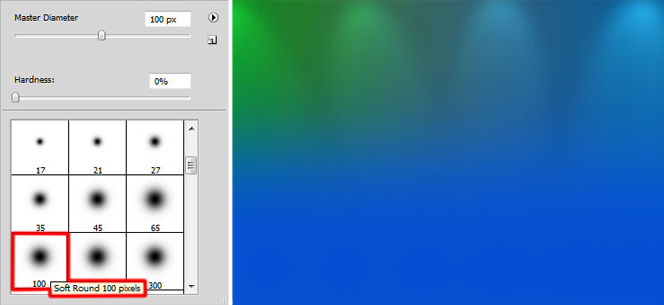
Create a new layer and using a brush paint the bottom of the layer. Brush Color: R: 5, G: 80, B: 210.

photoshop paint layer

Add a Layer Mask by clicking on the button Add Layer Mask, which is located at the bottom of the Layers palette.Then use a brush of black color with a value of Opacity - 30%. She paints a vivid blue background on the relevant parts so that it does not stand out. The result should look like this:

Set the Blend Mode is set to Luminocity.

Create a new layer. Choosing the same brush, but white with the Opacity to 10%, which would be "light" bottom layer.

Set the Blend Mode to the value of Overlay.

Now the first part of a lesson on how to create the Windows 7 wallpaper for your desktop can be considered complete - will continue to add the logo of the system.

Read More →

Winter Wallpaper and Pictures

Winter - also one of the most beautiful and cold then, possibly, in the contrast of its charm and appeal. The winter period is not just a blizzard, blizzards and snowfalls (which can cast a spell), even a hot chocolate, snowboards and skis, Christmas holidays, and only what is happiness and fun for the kids, I think, no need to talk. It is a pity, though, that not always and everywhere these days you can watch this very winter - looks out the window in the middle of December, and there the sun is shining and dry. That has to inspire a different winter downloading a picture or even a winter wallpaper for your desktop. Although in recent winters has finally manifested itself, causing sometimes emergencies in large cities.

But, despite this, it is still winter charming - whether a quiet little frosty weather, when the sun shines, whether it be a blizzard outside, when you sit by the fireplace, sipping hot chocolate or a nice light snowfall, when the snowflakes flakes slowly fall to the ground . If you do not like the mood, then we will try to help in this by the wonderful winter pictures and wallpapers - install them on your desktop, print and hang on the wall or put in a frame near the company so imbued with this spirit. I'm not talking about Christmas and New Year holidays - twinkling lights in the streets, in the windows of shops, parks and alleys. Take a minute and see how it all beautifully.

As I said above, this article should help you to revive and remember the spirit of winter fun, or something like that.For all to thank the author of this wonderful article , which contains 45 different colorful winter pictures, illustrations, some of them can be downloaded and installed for your computer beautiful winter wallpapers. In general, enough to fiery speeches, watch and get pleasure :)

Beautiful winter pictures, illustrations,

Winter Illustration (Winter illustration)

beautiful winter pictures

Beautiful and sunny winter illustration of details, it would seem not so much a part of them are sketchy, but how accurately captured the mood.

Winter Friends (Winter Friends)

Winter Snowman

Such a beautiful festive snowman :) The picture is perfect for a postcard.

Athansor

Winter white horse image

Amazing for the implementation of the work, the author - a true artist.

I Love Snow (I love the snow)

Pictures zimka snow

Lovely winter picture, for some reason immediately thought about the card, too.

La fille de la neige

winter picture postcard

Just a very beautiful and atmospheric winter picture.

Winter Sun (winter sun)

Winter picture download

Just snow queen, the detail is impressive.

Winter Tears (winter tears)

Winter girl picture

A little sad, but very beautiful winter illustration.

Winter's Kiss (Kiss winter)

download pictures winter

A beautiful illustration of winter.

Winter (Winter)

Winter picture download

The image, I think nothing would have given way to the seen similar situations in real life - a beautiful white horse of the winter landscape.

Winter wallpaper

Winter Pictures - is a good thing, but nothing could be more efficient in terms of inspiration and a wake-up the festive mood as winter wallpaper.

Lost in Winter (a lost winter).

winter wallpaper

Pleasant is a bright picture with large snowflakes.

Winter Season (winter time) - you can download the 1024px × 768px (alas, only a small wallpaper)

Winter wallpaper

This landscape will leave no one indifferent, and setting these winter wallpaper ski season will be remembered for a long time :)

Central Park in Winter, New York City - download 1600px × 1200px.

winter wallpaper

The famous Central Park, I think everyone saw as a child movie "Home Alone 2" :)

Winter Dream (Winter Dream) - you can download at 2560px × 1024px for two monitors.

winter wallpaper

These are great winter wallpaper can be used on a single monitor - to allow easy you can cut part of the image.

Snow Path (snowy road) - the format of 2560px × 1024px for two monitors.

winter landscape wallpapers

Very beautiful wallpaper, again, you can reduce a picture or cut out part of a single monitor.

Winter (Winter) - download 1680px × 1050px.

winter wallpaper

Even some snow-capped mountains - a good solution for a desktop wallpaper.

Frosty snowman (snowman Frosty), download the 1600px × 1200px

winter wallpaper snowman

Siberian Winter four (4 :) Siberian winter - download 1600px × 1200px.

Winter wallpaper

I remember once a long time ago on one of the first component, I had such a splash.

Winter Wallpaper (winter wallpaper) - you can download at 1600px × 1200px and other resolutions.

wallpaper winter

One of the best - you are here and the landscape, and snow, Christmas trees and sunshine. Beauty ...

Winter Wallpaper (winter wallpaper) - download 1680px × 1050px and other formats.

beautiful winter wallpapers

Very nice winter wallpaper of high quality.

Winter Star Filled Skies - you can download it to a maximum of 3008px × 1960px.

Northern Lights Wallpaper

Northern lights - just a mystical and very beautiful picture.

I hope the winter collection of beautiful wallpapers on your desktop just like you do not, then come in handy. Have a nice winter and the holidays!

Read More →