Main Nav

Showing posts with label Online-Services. Show all posts

Apr 15, 2013

SEO Optimization Services - How do they Boost the Traffic

http://www.kenwebseo.com/images/off-page-seo.png
Every organization that holds a web site should opt for Search Engine Optimization if they are trying hard to get their website as high as possible on Yahoo, Google or Bing search results page which is an ingredient of their growth strategy. At its basic part, "SEO" refers to finding techniques to boost your website's presence in the search results of the web visitors. This generally leads to more traffic to your website.
SEO will help you to restructure a website completely with the help of an organization who specializes in this field. The professionals will take few simple steps in order to enhance your search engine ranking. But, you need to give all your effort on how you approach towards your website. Mentioned below are ten essential steps that will boost your traffic through SEO Optimization services:

  1. Monitor where you stand – You won’t be able to understand where you are standing unless you keep monitoring your search standings. You need to observe the page rankings with the help of various tools. You also need to check out your Referrer log on regular intervals to track your incoming visitors and the search terms they are making use of to get onto your website.

  2. Keywords – You should be well aware of the places where you are fitting the keywords. You should place your keywords rightly on URLs, content, title and image names. The page header and title tag are two important places to fit your keywords. Do not place ridiculous amount of keyword on your website so that your website gets the label of “spammer”.

  3. Link back to yourself – There are no basic strategy in terms of Search Engine Optimization than the integration of internal links onto your website. It will be easier for you to boost up traffic to your individual pages. You should opt for anchor text which is search engine friendly.

  4. Create Sitemap – Adding a sitemap – interlinking to all the other pages in addition to page listing makes it quite easier for the spiders to look out for your website.

  5. Search=Friendly URL’s – You have to make your URL quite search engine friendly by naming the site with apparent words.

  6. Avoid Flash – You might think that Flash looks quite good but in reality Flash does nothing for your SEO.

  7. Image Descriptions – Spiders can only search text, not text in your images – which is why you need to make the words associated with the images in a proper descriptive manner as it is required.

  8. Content – The content on your website should be unique and fresh and it should also be updated on a regular basis. This will facilitate you by increasing the traffic on your website.

  9. Social Media Distribution – You should have proper distribution of links to all fresh unique contents to your website on social networking platforms.

  10. Link to others – An easy way to direct more traffic to your website is by developing is by developing proper relationship with the websites.

So, this is how SEO Optimization services can boost your traffic.
Read More →

Jun 2, 2012

How to Create Favicon (ico file)

Site without favicon (favicon), as a ship without a flag. Favicon - an integral part of the brand site, its image and identity. By the way, look for the issuance of any search engine (such as Yandex). You will definitely find a number of titles found pages and documents favicon. That is, favicon, it is also a factor which increases click through your site in search results. Therefore, no favicon anywhere!

How to make a favicon? The process can be divided into two stages:

  1. Making favicon or the presence of already finished;
  2. Install it on site.

The first task, as has been indicated, there may be several approaches. If you for some reason you do not want to make favicon yourself, you are too lazy, do not have time or do not know how, and to try and experiment there is no desire, you can find it at one of the sites, libraries, finished favicon. The main disadvantage of this option - hardly your icon will be original. Rather, it is already used in dozens, if not hundreds or thousands of sites.Therefore, in this case, the relevant question: "Do I need a favicon at all?". To me, this element must be unique, even if it is as simple as "3 penny". Therefore, from this version is better favicon refused and made his own hands.Let's stop this process in detail.

Start making favicon can be in a photo editor or by using special service. In the first case does not necessarily seek the help of desktop applications (eg, Photoshop), you can use the free online raster graphics editor . All you need - to create a 16x16 paper and anything on this "canvas" to portray. Fill the background, try to draw something "pencil" or to put any symbol or letter. In the screenshot example of a "masterpiece" that I began to paint using the service  Pixlr :

Pixlr create favion

The result can be saved in the format ". Gif" or ". Png".

For me as a tool to use graphics editor - the organic option, but it is not only because there are special services that can help you draw a favicon. An example would be the site Favicon.cc, which allows you to create an icon in pixels:

Service favicon.cc

This is just one example, in fact there are so many sites - services to create favicon online - free of charge, with the same functionality and for every taste.

Whichever option you would choose, create favicon is not very complex and interesting. Install the same problem does not deliver. Once you've finished, save the icon on your computer, it can be converted into a format ". Ico", or use the files ". Gif" or ". Png". The principal difference will not be just about any option, if desired in the future it will be possible to animate. It remains the last - pour favicon in the "root" of the site (named favicon) and add the code in the head section:

<link rel="shortcut icon" href="put_k_ikonke/favicon.ico" />

(If you have a favicon format other than ". Ico", you must specify the desired type of file)

In this process of creating and installing favicon, can be considered complete. If you need any additional information on the icon, it is possible to look out my article 2 a year ago in another blog - all about favicon.ico icons - most of the data they are still relevant.

Read More →

Online Free Vector Graphics Editor

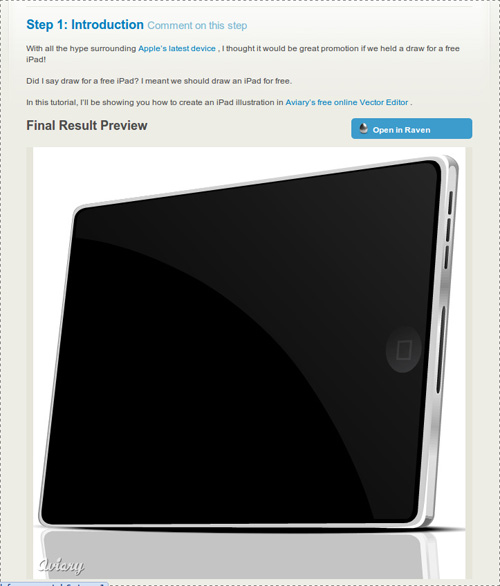
Do you know how to draw a vector line Apple iPad? No? Most likely you do not even know that there is such a powerful on-line vector graphics editor of Aviary's -Raven ! Online applications are constantly evolving, because today they can achieve a good result. Before moving on to the review of this application, I would like to see that developers mougt Aviary boasts not only the product. On this site you can find a collection of useful online services for designers and graphics, which I once wrote in one of his blogs. In addition to online vector graphics editor can find the usual graphic editor, tools for creating effects, working with palettes, and screenshots.

But back to our Raven and Apple iPad - not to be unfounded, the tablet will give an example, drawn with the help of Raven:

draw the Apple iPad

In fact, even today this illustration - not an easy task for an untrained person, even if his hand is CorelDraw or Adobe Illustrator, to say nothing of a web application? But, as you see at the moment it is quite doable task.Moreover, the site Aviary, a simple tutorial, you will learn how to even. But let us still closer look at the editor!

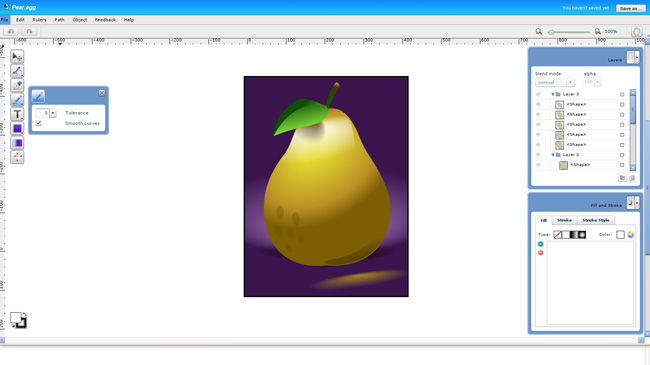
Interfeyc Raven is not as complicated as those mentioned above, CorelDraw or Adobe Illustrator, so the application can be considered even as a testing ground for the study of vector graphics:

online vector editor

Of course, the functional to full vector graphics editor application that far. But do not forget that this is a online service which, by the way supports even things like layers and blend modes (Blend mode).

Complete engine "curves." Working with curves, fills, strokes, gradients and objects is realized at a fairly advanced level (of course, not as in CorelDraw or Illustrator, but still);

Supports layers. It supports layers, groups, layers, layer masks;

"Import" from the popular social services. Import from Flickr, Picasa and Facebook;

The training system through the tutorials. While they certainly are not enough, but to all appearances their number will keep growing.

In short, Raven - a very neat and functional online editor of vector graphics. If you do it, I advise you to look necessarily. Finally I bring to your attention a little video about how to create a small vector image using Raven:


In principle, any online applications are not yet able to completely replace the desktop solution, but due to their mobility can compete with them in certain situations.

Read More →

Create a portfolio with the help of online service Portfolios

Online-Services , a designer , an overview of services , useful websites , portfolios .

For working on the "free bread" designer, animator, photographer, or any way that does not define a good chance to get an order (or job) as having an attractive portfolio. Previously, portfolios were largely on paper or shown with the help of his computer, the trend of today (especially if you are looking for a job on the internet) - on-line portfolio.You'll notice that almost every site contains a freelance exchanges the ability to upload and showcase their work, but what if you want to create their personal online portfolio, which is independent of any internet projects.

Create your own online portfolio in several ways. The most difficult and time-consuming way - buy a domain and create his own website on it. The easiest - use the service to create a portfolio Portfolios ! In the first case, of course, you will have almost limitless options for customizing the functionality and appearance, but, unfortunately, without any special knowledge of development of sites here will not do (or the cash outlay). Option number 2 - a very interesting solution, which propose to examine in more detail.

Online Portfolio

So, Portfolios - an online service through which a person's creative specialties (painter, designer, makeup artist, illustrator, flasher, etc.) can easily create a free and fully customizable portfolio site.

In the Portfolios you can (just a few possibilities):

  • Choose a variety of design layouts and customize them;
  • Upload images and high resolution without compression (you can load multiple images at once);
  • Post videos and Flash (for use with the popular video service YouTube and Vimeo Video Hosting just point the downloaded video link);
  • Connect your own domain;
  • Use your own logo;
  • To study the statistics of attendance;
  • Maintain your own blog on the Portfolios;
  • Communicate with other members of Portfolios;
  • Add a comment, discuss and evaluate the other portfolios.

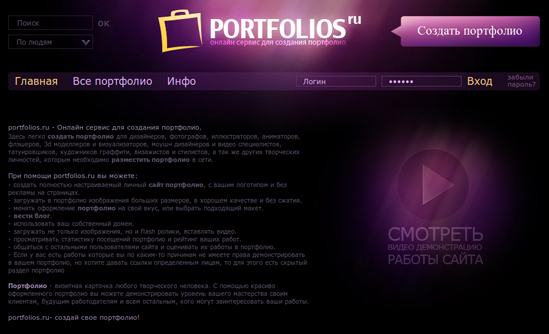
In fact Portfolios combines the two mediums. The first - a personal portfolio management mechanism online, where you can perform all configuration, installation, download pictures and files. The second - the site itself portfolio, which saw customers. To better understand what are the portfolio in Portfolios, worth looking at some examples:

online portfolio

And, of course, the same video with a demonstration of all the features of the service Portfolios.


Portfolios not only provides an opportunity for everyone to create their own professional looking portfolio (of course, the content on your conscience.) This is one of its kind social networking site for professionals and even a blog-hosting service. The most important thing - the service, of course, can bring huge benefits to freelancers. So the people of creative professions are obliged, to get to the Portfolios Portfolio!

Read More →

May 31, 2012

Free Font Embedding Recognition Service

So, you look at your favorite resources and find it on the site that uses a font that you like. Do you also want a font (and the sooner the better!) ... And what should be done to find out the name of this font? Sound familiar? Yes, we all have been in similar situations.

The easiest option - just write the webmaster of this site and ask the name of the font, but also where it can be taken. The answer may not come immediately, in addition, not all webmasters are responsible for such letters. So I decided to compile a list of free online resources to accelerate the process of identifying a font.

A. What The Font

Service What The Font created one of the largest font (myfonts.com, - shareable). This resource is number 1 on your list of identifiers of fonts. Just download the picture with the font that you want to identify the server WTF (do a screenshot and carve the word with the pleasant characters - shareable) or insert a link to the image of the font in a special line. The system will show you the results in the different versions of fonts.

What The Font

If the system does not recognize the font, you will be asked to go to the Font Forum , where you can post the picture with the font and wait for a response from the experts about what this might be a font. I've used both, and this is usually solved most of my questions regarding fonts

Identifont

This service is called Identifont uses a different approach to identifying and finds your fonts by asking some questions about it. This resource can be useful for you if you do not have the font image that you are looking for. In truth, I myself have never been able to find a font through this service, but maybe I'm the exception!

Search Font Identifont

The developers of the service argue that it is "the largest independent resource for fonts on the Internet that contains information about fonts from 534 publishers and 143 vendors."

Message Boards: Typophile

Typophile - this may be the greatest and largest community of experts on the fonts. Your question you can ask, posted a picture with the font on their forum. If this resource does not help you, the majority of sites on fonts (typically, sites with free fonts) is a forum where you can post the question and a picture with the font you are looking for.

Typophile community fonts

Bowfin Printworks

Website Bowfint Printworks offers a wealth of information and a variety of online tools to identify the font, asking questions about the form of font glyph. This resource on the scheme works similar to Identifont, but it seems to work faster, because All data is entered on the same page, while Identifont makes you go through many pages, which may seem tedious. The site includes a guide to font Script, Bauhaus-style, Sans Serif, and Serif, and Lined.

Site Bowfint Printwork

The site owner is also willing to answer any questions relating to the identification of the font, by e-mail.

TypeNavigator

TypeNavigator created by developers Fontshop. It uses the same operating principles as Bowfint, ie asks questions about the shape of each letter.

Service TypeNavigator

It should sweep that at the time of publication of the article there were some problems with downloading services, but the developers promised to fix the problem soon.

Flickr Typeface Identification

The popular photohosting Flickr group is typeid (Flickr Typeface Identification), dedicated to the identification of fonts, and a group of Fonts in Use , which laid out the fonts used in the different pictures (logos, labels, posters, etc. - shareable). These services may be useful for quick reference about the fonts.

Group Flickr Typeface Identification

PS Group typeid much more active, and there you can get a faster answer to your question

Lists fonts

Sometimes the best way to find a font is a font viewing lists, which contain the most commonly used fonts. Here are some popular resources with lists of fonts. You can use them to quickly obtain information about fonts.

list of fonts Modern Life Blog

Modern Life Blog

The Logos of Web 2.0

The Logos of Web 2.0

Just Creative Design font list

Just Creative Design

Smashing Magazine

Smashing Magazine

list of fonts Urban Fonts

Urban Fonts

PS On behalf of myself and the readers of Design Mania would like to thank the project for this perennial selection of really useful in the service. Original article can be found at Deport Webdesign . Sometimes it is from the font in the design of the site depends on many things. The most commonly used, of course, standard operating time, but with the development of the Internet, HTML5, services, font designers are gradually paying attention to other design features of texts.

Read More →