Looking the other night in my mail and found it an interesting letter from the publishing house "Peter." If someone had told me something similar institute in distant years, when does the reading of some books on computer topics, would never have believed it. Now, given my profession blogging and authorship of the project design Mania, they offered me a little bit, and collaborate together to tell blog readers about an interesting book. The practice, in principle, quite typical in the blogosphere, so of course I gladly accepted. For the theme of the project is best suited Steve Krug book " How to make a website easy. Usability by Steve Krug on a method . " And if the web design for me is more a hobby than work, the creation of the site and the question of its effectiveness - the theme is much more intimate.
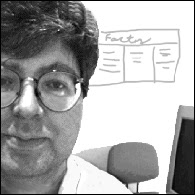 To begin with a few words about the author. Steve Krug (Steve Krug) - usability specialist, bestselling author in the same yuzabilti "Do not make me think." He works in his own consulting company, has a great many years of experience in the design of interfaces and overgrown with usability testing.Boasts some of the most renowned for its customers such as Apple, AOL, the IMF, Bloomber.com, etc. Most of the time Steve Krug is engaged in conducting seminars, well, just consulting.
Honestly, before the book came in the mail "by the method of Usability by Steve Krug" only known to me was the usability experts , Jakob Nielsen .Now, we can say, I expanded my (and yours, I hope) because the horizons of what Steve has to tell the public. After the first book, "Do not Make Me Think" Krug has become a very popular specialist, began to actively organize seminars, advise, and then at one point, he says, in a weak moment signed a new contract with a publisher.
For example, the question of whether this world need another book on usability testing? You can read the following.
I did not invent the wheel. Usability testing has come into our world long ago, and many famous people, the most influential of them - Jakob Nielsen, more than twenty years of preaching the idea of "affordable usability testing."
There are several wonderful books, which explains in detail how to test usability. I strongly recommend that you read at least one of them, when you happen to do testing. His favorite book on this theme, I have listed in Chapter 15.
However, this book differs from existing in at least two aspects.
It is not comprehensive. I guess you did not become usability and will not be a matter of life and that this word is not even in your job description. If so, you will not necessarily know all the nuances and spend a lot of time on their comprehension. This book, like the previous ("Do not Make Me Think"), I tried to make a sufficiently thin (200 pages), so that it can be read, for example, in the plane.
This book is written not to make you an expert on severe or usability testing. It is necessary for you to know which end to approach the testing itself. Some of you, of course, this theme will entice enough to need to know about it as much as possible. For these and I wrote a chapter 15. But in general, to be tested and get this huge impact, not to know anything more written on these pages.
This book is not only about how to find usability problems . Unlike many other publications, this also explains how to fix identified problems.
I can confirm all these words are 100%, though I am very involved (or rather did not do) usability, but from the first page was simply a human interest. And given how quickly read the book to find out all the details of this process somewhere along the road to transport or a rainy autumn evening - simple. In addition, such a reading also draws from the other side, that all this is really an invaluable experience, "knowledgeable" person.
And it is interesting that the question, " And your tips are only suitable for web-sites "you can find the answer.
In writing this book, I focused on testing sites, because these days most need this, and because it is possible to make the book a thin and simple. But exactly the same methods and principles can and should be used in testing and improving the whole, than are men. Network and local applications - is the most obvious sites for testing, but no one bothers with the same methods to estimate the ballots, cell phones, presentation, laid out in PowerPoint, Digital fotikom instructions and forms that you fill out when it comes to the doctor. I would suggest to you, wherever I have written "your website" to believe that it says "your product".
Actually it would be logical to continue to publish the contents of the book "Usability of the method by Steve Krug."
The discovery of usability problems
- Chapter 1. Elephants, it can not see 20. What is an independent usability testing, why it always works and why it is so rarely performed.
- Chapter 2. And now I saw cut my [excellent] assistant in half. In what looks like an independent testing
- Chapter 3. One morning in the month - we do not ask for more. The plan, which you can easily follow the
- Chapter 4. When and what to test. Why are the most difficult has to do first
- Chapter 5. Do not hammer nails with a microscope. Who to test and how to find these people
- Chapter 6. Take them to task. The choice of targets for testing and scripting
- Chapter 7. A few boring checklists. Why they should be used, even if you (like me) hate them
- Chapter 8. Telepathy without tension. Testing
- Chapter 9. This is somewhat similar to the sport. How to captivate all the match and what to bring to their attention
Resolving problems with usability
- Chapter 10. "Debriefing". Compare experience and decide what to eliminate the shortcomings
- Chapter 11. Less is better. Why fix problems should carry as little as possible actions
- Chapter 12. The Usual Suspects. Some of the problems that you will surely find, and thinking about their elimination
- Chapter 13. Life has become better, life has become happier? The Art of pleasant manners
Just go!
- Chapter 14. Teleportation without tension. Remote testing: fast, cheap and slightly uncontrolled
- Chapter 15. Only for advanced users. A list of recommended literature
- Chapter 16. Good luck, friends. A few parting words. An example of the script and the agreement on record
In general, usability testing can be very simple and informal employment. You just need to find time for it and read the book :) Steve Krug said as he held seminars that they say, first of all the assorted audience of a site for an example, and then decided to introduce an original method. He allowed himself participants usability testing - how it was raboaet :) That is the site is taken as an example and volunteer to perform some common tasks for which this is the site and set up.
Test results are almost always the same:
Talk a good time testing and eventually breaks a storm of applause for his bravery.
"Owners" of the site, all 15 minutes furiously writes, what problems must be solved, and asks whether it is possible to obtain a record of what was happening to show your team and your boss.
Others come to mind, "Heh-heh. Is that all? So I could. "
Upon completion of testing, I ask: "How do you think is worthwhile way to spend 15 minutes? - And all under the nod.
So if you somehow are building high-quality and user-friendly site, you can safely buy and read the book " How to make a website easy. Usability by Steve Krug by the method of "online publisher Peter. In the same way, find a small piece, but rather one chapter from the book.


